📖 13 min read · 2,548 words
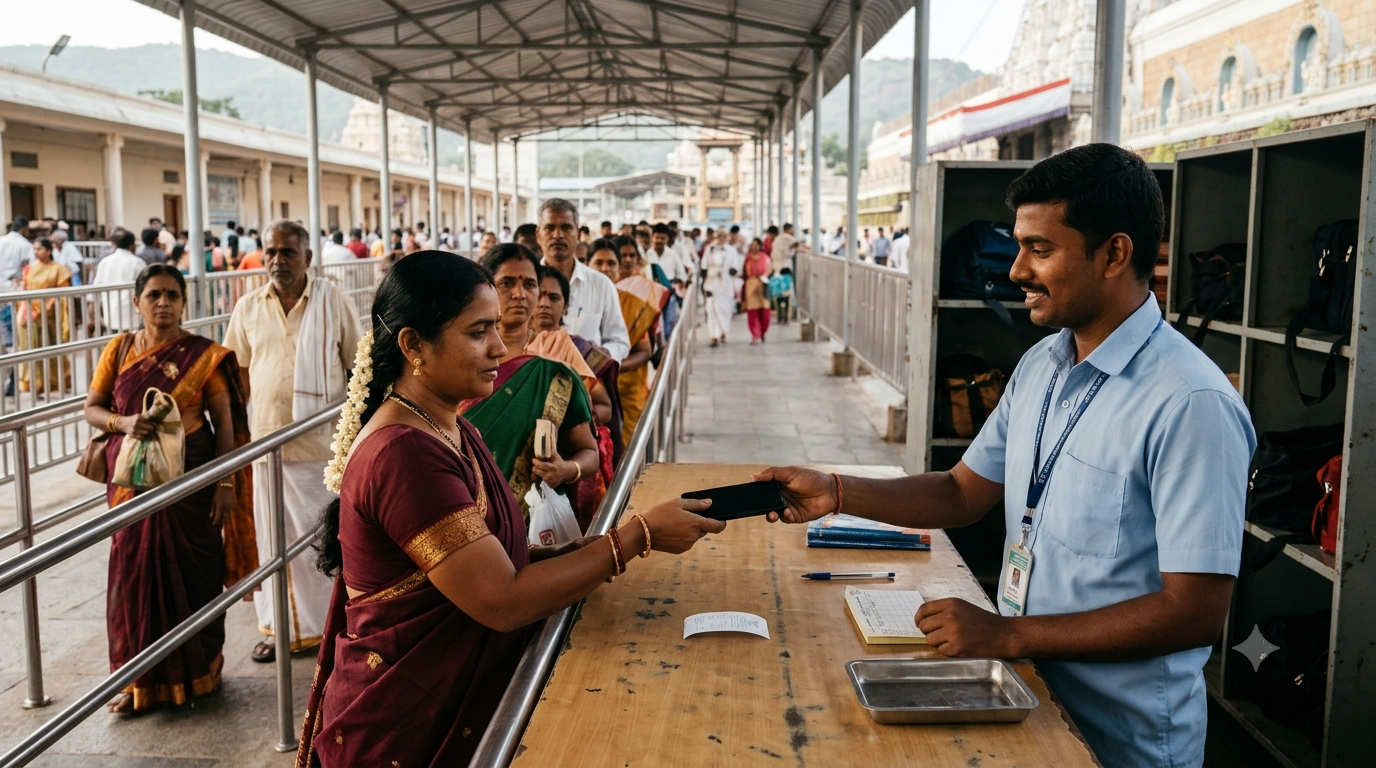
A Tirumala mobile locker is the TTD facility pilgrims use to deposit phones before darshan. In practice, this usually means a staffed deposit counter, not a self-service locker that opens with an Aadhaar or room-key swipe. The important things are simple: choose an official counter, take the receipt, confirm where to collect your phone, and keep that receipt safe until you get your belongings back.
Independent guide: Prayanamam is not affiliated with Tirumala Tirupati Devasthanams (TTD). We do not accept locker bookings, hold belongings, collect payments or act as a TTD service provider. For official instructions, use the TTD sources linked below.
Tirumala mobile locker: key facts before darshan
- Service: TTD operates free staffed counters for mobile phones, bags and luggage.
- Proof: Collect the original receipt or token when you hand over an item.
- Tracking: TTD describes QR-coded tags and reference numbers in its newer deposit-and-delivery system.
- Collection: The pickup point may differ from the deposit counter. Confirm it with staff.
- Location: Counters serve several darshan areas and pedestrian routes, not just one building.
- Precaution: Do not rely on an online locker reservation, swipe code or special valuables locker without direct confirmation from TTD.
TTD’s 16 June 2026 report on luggage deposit and delivery confirms the free service and explains how the receipt supports collection. Its counter lists describe the network at that time, not an unchanging map for every future visit.
What the Tirumala mobile locker service actually covers
The name can be confusing because many visitors search for a “locker” when they simply need to leave a phone before entering the temple. TTD’s official guidance describes luggage and mobile deposit centres with attendants. The staff accept the item and issue proof that you later present for collection.
TTD also uses digital tracking behind the Tirumala mobile locker counter. However, that does not mean every pilgrim operates a private electronic locker. The published deposit-and-delivery instructions do not establish an Aadhaar-swipe or guest-house-key process for the service described here.
This page focuses on mobile deposit for darshan. For heavy suitcases, PAC storage and other luggage arrangements, read our separate Tirumala luggage counters guide. Check its operational details against current TTD directions too.
Where are the official phone deposit counters?
TTD lists multiple mobile and baggage deposit points across Tirumala. Choose the counter staff direct you to for your current darshan reporting area. The location of a counter does not guarantee that your phone will return to the same window after darshan.
| Area named by TTD | What to know |
|---|---|
| Vaikuntham Queue Complex | TTD lists mobile deposit facilities serving its queue complex. |
| Free Hall and Narayanagiri sheds | These are among the deposit areas identified in TTD’s June 2026 release. |
| ₹300 Darshan Hall and Divya Darshan Hall | Ask staff which mobile-deposit window serves your reporting route. |
| Supatham, VQC-1 main gate and designated special counters | TTD lists specific counters; access and use depend on staff directions. |
| Kalyanakatta area | TTD also describes facilities near the hair-offering complex. |
Because reporting gates and crowd arrangements can change, avoid choosing a deposit point from an old online map alone. Locate the official TTD signboard, then ask where your phone will go for collection. If you arrive on foot, the baggage transport process follows a different route.
How to use a Tirumala mobile locker counter
Use the staffed TTD counter identified for your darshan route. The basic procedure is to hand over the phone, take the issued receipt, and produce that receipt when collecting the item. The sequence below follows TTD’s published deposit-and-delivery guidance while allowing for on-site instructions.
- Find an official counter. Follow TTD signage near your assigned reporting area. Ask a staff member if you cannot identify the correct mobile deposit window.
- Prepare your belongings. Keep your darshan documents, essential medicines and any items you need during the queue outside the deposited bag. Follow security staff’s current rules.
- Hand over the phone or bag. Let the counter staff complete the accepted deposit procedure. Do not hand your phone to an unauthorised helper.
- Collect the physical receipt or token. TTD says its system issues a reference linked to the tagged item. Check the details before leaving the counter.
- Confirm the pickup point. Ask staff to identify the delivery centre and the route to it. Do this even if the receipt carries a location.
- Keep the receipt with you. Put it in a secure pocket or wallet, separate from any bag you deposit. You cannot rely on photographing it with the phone you have handed over.
- Collect after darshan. Follow TTD directions to the correct delivery centre, present the original proof and check your phone before leaving.
Collection is not a self-service unlock step. TTD staff use the receipt or token to locate the matching item and complete the handover.
Tirumala mobile locker receipt: what should you check?
TTD’s June 2026 statement describes a QR-coded sticker on the deposited item and a receipt carrying its details. The same announcement says the reference number helps staff retrieve the item. At the Alipiri baggage counter, a separate March 2026 TTD report specifically describes issuing a QR-coded receipt.
Look at the actual receipt you receive, not a sample screenshot online. Check the reference number and the recorded item details where shown. If it lists a centre, route or counter, ask staff to confirm what that field means for collection.
- Match the receipt’s item description or count with what you gave the attendant, where those details appear.
- Keep the printed reference, barcode or QR code clean and readable.
- Ask the attendant to explain any unclear number or pickup instruction before going into the queue.
- If your party receives separate receipts, give each original slip to a responsible adult in the group.
TTD has not published one universal receipt layout for every counter in the material cited here. Therefore, do not assume all slips display identical fields or that every slip prints a fixed PAC IV collection point.
Where do you collect a phone after darshan?
Your Tirumala mobile locker collection centre depends on how TTD routes the deposit. Its official releases mention delivery facilities around the General Pilgrim Complex (GNC), Tirumala Bus Complex (TBC), Pilgrim Amenities Complex (PAC) counters and other numbered counters. These names are not interchangeable pickup instructions.
Check the collection information on the actual receipt, if provided, and confirm it with staff at deposit. After darshan, follow the matching TTD signboards and show the original token or receipt. Do not automatically return to the deposit window or assume that every item goes to PAC IV.
TTD says its reference system can help staff retrieve items rapidly. Yet it does not guarantee a one-minute handover at every counter or during every crowded period.
Is the Tirumala mobile locker service free?
Yes. TTD expressly describes its staffed luggage and mobile deposit-and-delivery service as free. Its June 2026 notice asks devotees to use official TTD counters rather than hand their items to unofficial people. The notice does not set out the old article’s claimed rule requiring a darshan ticket, seva token or accommodation receipt merely to deposit a phone.
Follow any identity or counter-entry checks that staff currently apply, but do not treat those old eligibility claims as confirmed policy. No separate online payment should be necessary for the free staffed deposit service.
Individual lock-and-key storage, where offered, is a different facility. This article does not verify its availability, terms or any caution deposit. Ask TTD directly rather than treating the free counter service as a promise of a private locker.
Can you store cash, jewellery or other valuables?
Do not assume a Tirumala mobile locker counter accepts expensive jewellery, substantial cash, passports or other valuables for safekeeping. TTD’s public deposit reports cover ordinary luggage, bags and mobile phones. They do not establish a bank-style valuables-storage guarantee for pilgrims.
Carry only what you need, and avoid bringing unnecessary valuables into a crowded queue. Keep necessary identity proof and medicines accessible, while also following current entry restrictions. If you need storage for something unusual, ask the official counter what it can accept before handing over the item.
The old advice to use a specific GNC “bank locker” for high-value possessions has therefore been removed. A named location is not proof of insurance, secure-custody terms or permission to store cash.
Are Aadhaar-swipe or guest-house digital lockers available?
The official TTD deposit-and-delivery releases reviewed for this guide do not confirm the old claims about 126 e-Swipe phone lockers, room-key access or Aadhaar unlocking. They also do not support a universal no-receipt collection procedure. Therefore, those steps should not guide your temple visit.
If a TTD guest house offers a separate locker facility during your stay, ask its reception staff for the current rules. Do not confuse that accommodation service with the manned mobile deposit counters before darshan.
What if your receipt is lost or the QR code cannot be read?
Approach the official TTD collection staff as soon as you discover the problem. Explain which counter accepted the phone and roughly when you deposited it. Staff must decide what identification or further verification they need before releasing an item.
There is no verified public shortcut that guarantees release without the original receipt. Do not send personal documents, a receipt photograph or payment to someone on WhatsApp claiming to recover your phone. If the first window cannot help, request direction to its TTD supervisor.
When the slip is damaged but still available, show it rather than discarding it. The printed reference or other visible details may still help staff trace the deposit.
Mobile deposit for Alipiri and Srivari Mettu walkers
Footpath pilgrims should distinguish a Tirumala mobile locker deposit from luggage transport up the hill. TTD operates baggage deposit facilities at Alipiri and Srivari Mettu. Pilgrims can leave eligible luggage before walking and collect it at designated delivery centres in Tirumala.
In its 12 March 2026 Alipiri inspection report, TTD confirmed that staff issue QR-coded receipts for deposited luggage. Its June release also identifies delivery points near GNC and TBC for the footpath services.
Before starting the climb, ask where your own bag will arrive and whether your phone needs a separate deposit later. Keep drinking water and necessary medicines accessible during the walk. A footpath luggage receipt should never be treated as proof that every mobile deposit follows the same delivery route.
What should you avoid carrying into the temple?
Mobile phones and cameras should not enter the Srivari temple. TTD has also advised against bringing other electronic devices into the shrine. Security instructions may cover further items or vary by reporting area, so check current directions on arrival.
Do not rely on an old online list that promises entry for every type of watch, purse or bag. Separate items you might need from what you plan to deposit, then follow the temple’s security checks. The official TTD do’s and don’ts page is a useful starting point for general visit rules.
Planning the journey to Tirumala
Tirumala is reached by road from Tirupati, with buses and other transport taking pilgrims up the hill. Tirupati Railway Station is the main rail arrival point for many visitors. Travellers flying in generally arrive through Tirupati Airport and continue by road.
For your wider pilgrimage, see our Tirumala Tirupati complete guide. Check darshan details through the official TTD online services portal. Your darshan reporting instructions matter more than a fixed locker location copied from another traveller’s visit.
Tirumala mobile locker mistakes worth avoiding
- Choosing a counter too early: First confirm your darshan reporting area. Then ask which TTD deposit counter serves it.
- Leaving without a receipt: Count your deposited items and check the issued proof before walking away.
- Assuming pickup happens at the same place: Get the actual collection directions from staff at deposit.
- Keeping the token in the deposited bag: Put the original slip in a wallet or other pocket you retain.
- Bringing expensive possessions: An ordinary mobile counter is not a promised valuables vault.
- Trusting a paid “locker booking” agent: Use the official TTD counter and follow its directions.
The system serves large crowds, especially during festivals. Allow time for the deposit and later collection because a fast handover is not guaranteed. Meanwhile, families should agree where to meet after darshan without relying on their deposited phones.
Health and safety note for pilgrims
Tirumala visits may involve long queues and standing in changing weather. Elderly visitors, pregnant pilgrims and people with medical conditions should plan for rest and keep necessary medication accessible. Ask staff about permitted essential items before entering the queue.
If you intend to climb via Alipiri or Srivari Mettu, consider the physical effort and current weather conditions. Travel light, carry water for the walk where permitted, and seek medical advice before a strenuous climb if your health requires it.
Before you join the darshan queue
For a Tirumala mobile locker deposit, the safest plan is also the simplest: use an official staffed counter, obtain the real receipt and confirm the return location. Preserve that slip until staff hand back your belongings. Leave unsupported swipe-locker shortcuts and valuables-storage promises out of your plan, since TTD’s published guidance does not establish them.
Frequently asked questions
Are mobiles allowed inside the Tirumala temple?
No. TTD’s temple guidance prohibits mobile phones and cameras inside the shrine. Deposit your phone at an official counter before entering the restricted area, and follow the current directions at your darshan gate.
Do I need a ticket to use a Tirumala mobile locker?
TTD’s cited free deposit-and-delivery announcements do not publish the claimed universal ticket-or-room-receipt eligibility rule. Ask counter staff about any current access or identity checks. Do not assume a guest-house booking is necessary.
Is there a fee for TTD mobile deposit?
No. TTD states that its staffed luggage and mobile deposit-and-delivery service is free. This does not confirm the terms of any separate individual key-locker facility. Use official counters and avoid paid online deposit offers.
Will the phone come back to the same counter?
Not necessarily. TTD operates separate delivery points, so ask where your own item will go. Check any collection detail on your receipt and follow staff directions rather than assuming every phone goes to PAC IV.
What if I lose the TTD receipt?
Go to the official collection counter and explain the problem to staff. They may require checks before releasing an item, and no alternative release method is guaranteed. Do not pay a third party to “recover” it.
Does the receipt always contain a QR code?
TTD describes QR-linked tagging and reference-based collection, and it specifically confirms QR receipts at Alipiri. However, its public releases do not promise one identical receipt format across all counters. Keep whatever original proof the staff give you.
Can I reserve a mobile locker online?
The official deposit-and-delivery guidance reviewed here describes in-person TTD counters, not a public online reservation or swipe-unlock process. Do not buy a locker reservation from an unofficial site. Confirm any separate accommodation facility directly with TTD.
Are mobile deposit counters open all night?
TTD describes its wider baggage service as operating in shifts around the clock. That does not confirm identical hours or access at each individual window. Ask staff about the correct counter for your reporting time.